Last updated: 2026
Every electronic product you have ever used started as a hardware engineer's schematic. The pulse oximeter on a hospital patient, the controller in an electric car, the wireless earbuds in your pocket — somebody had to choose the right chips, design the schematic, lay out the PCB, fix the EMI problems, and get the product through certification.
That somebody is an embedded hardware design engineer. And the demand for them is growing faster than the supply.
This roadmap shows the path. Six phases, realistic timelines, specific projects, and the exact skills that hiring managers look for. Unlike most career guides, this one tells the truth: hardware engineering takes longer to master than firmware, because you cannot just download a debugger. You have to build, blow up, and rebuild physical things.
If you want a shorter path with less equipment investment, look at the Embedded Firmware Engineer Roadmap instead.
Who This Roadmap Is For
This guide is for you if:
-
You are an electronics or electrical engineering student
-
You like physical things more than pure software
-
You have built Arduino projects and want to design your own PCBs
-
You want to ship real products, not just code
-
This is not for you if:
-
You hate physics and circuit analysis
-
You only want to write software
-
You expect to be job-ready in 6 months (it will take longer)
What Does an Embedded Hardware Design Engineer Actually Do?
A hardware design engineer takes a product idea and turns it into a physical board that works reliably. The day-to-day involves:
-
Reading datasheets and selecting components
-
Designing schematics in Altium, KiCad, or OrCAD
-
Laying out PCBs with proper signal integrity
-
Calculating power budgets, thermal margins, and component ratings
-
Building prototypes, debugging them with oscilloscopes and logic analyzers
-
Working with manufacturers on DFM (Design for Manufacturing)
-
Running EMC tests and getting products certified
Hardware engineers work closely with firmware engineers, mechanical engineers, and product managers. Communication skills matter as much as technical skills.
The Skill Stack: What You Need to Learn
Hardware design skills form a stack. Each layer depends on the layers below it. You cannot design a high-speed board if you do not understand basic electronics. You cannot pass EMC if you do not understand return paths.
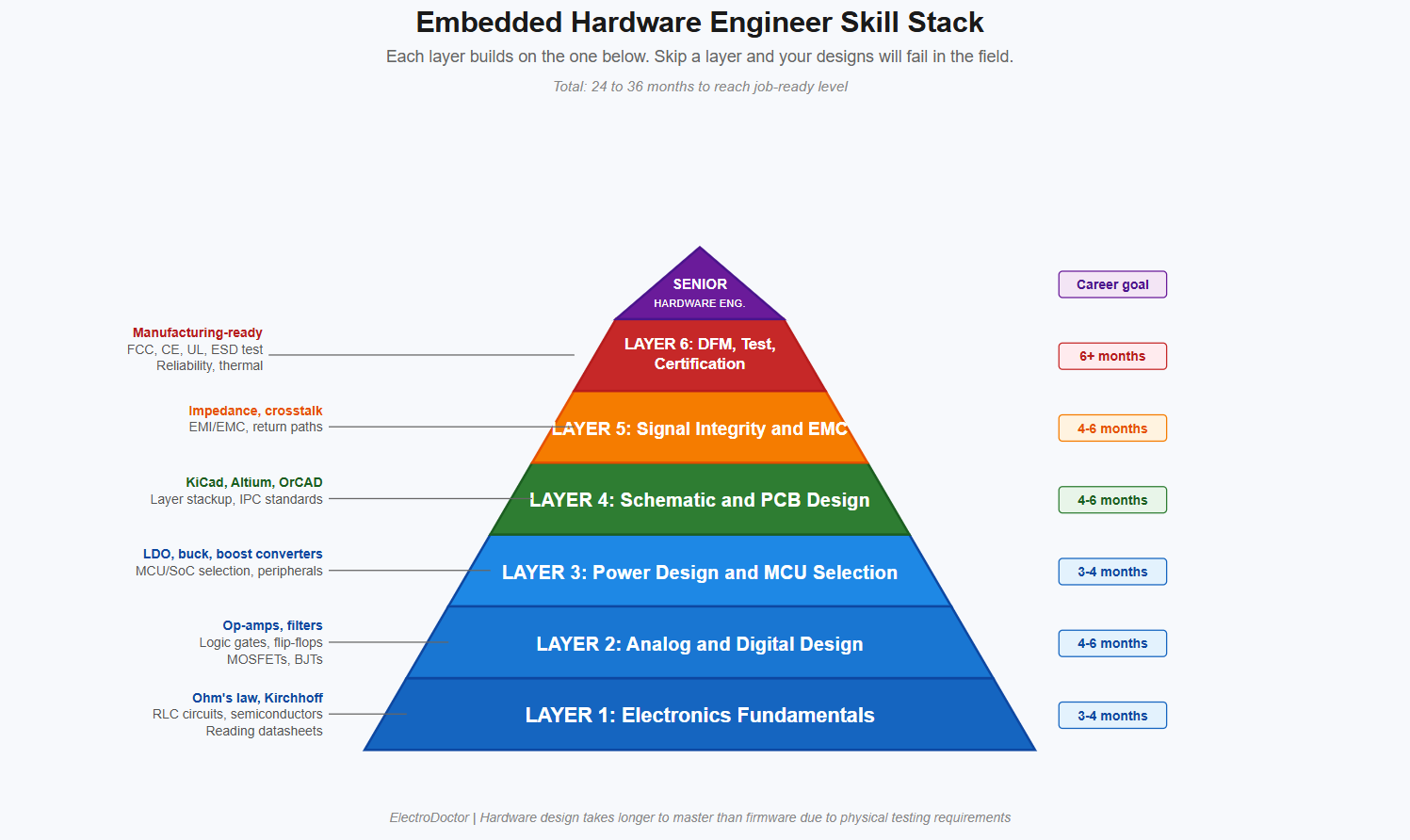
Total time to reach job-ready: roughly 24 to 36 months of focused, consistent learning. This is longer than the firmware roadmap because hardware learning requires building and testing physical boards. Each PCB revision takes 2-4 weeks to manufacture and assemble. That time adds up.
The Hardware Design Workflow
Before diving into the phases, you should understand what hardware engineers actually do day-to-day. This workflow is what you are training for.
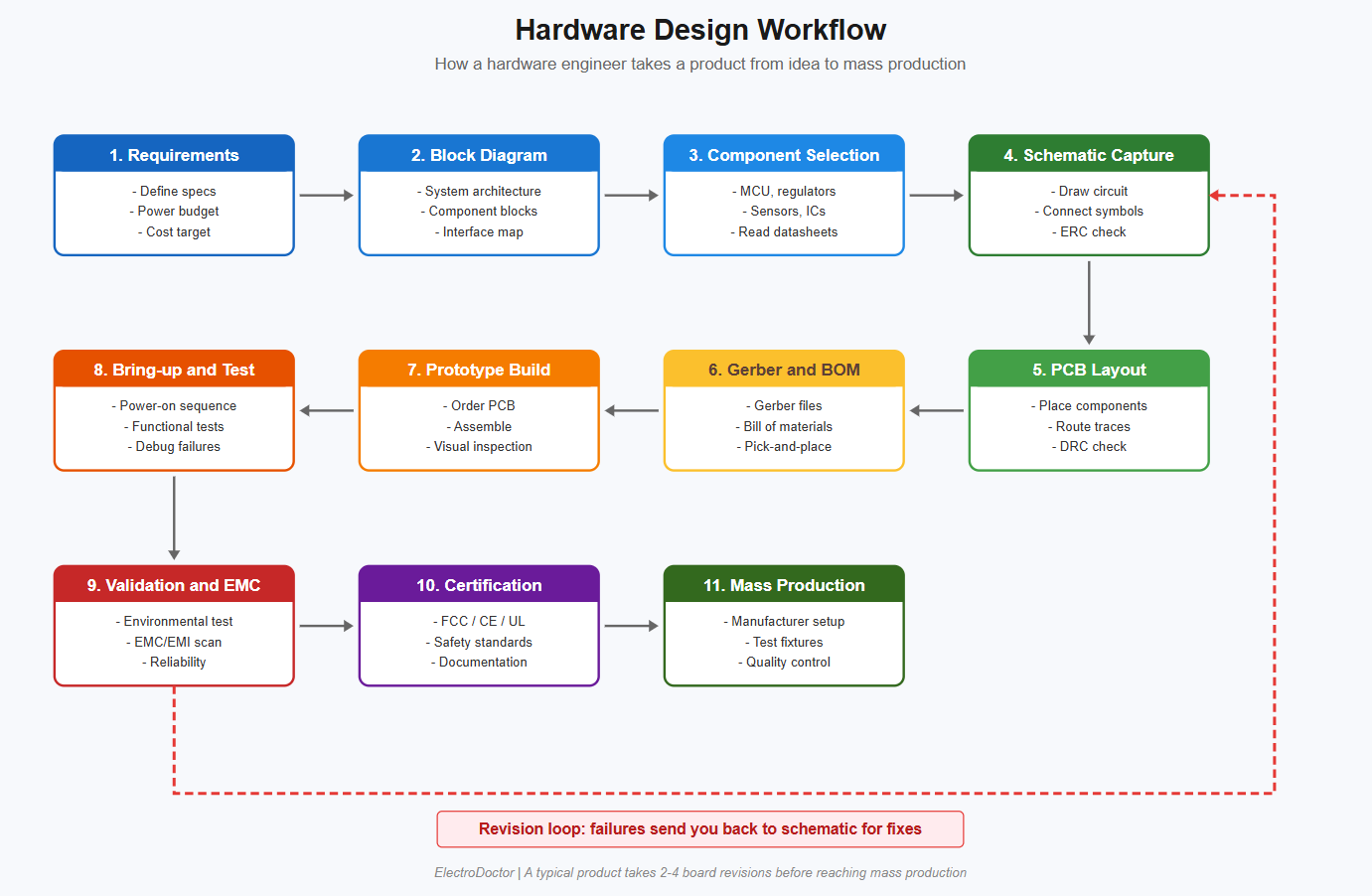
Notice the revision loop at the bottom. Real products almost never work perfectly on the first try. Two to four board revisions before mass production is normal. Even experienced engineers go through this cycle. The goal of training is not to avoid mistakes but to make better mistakes faster.
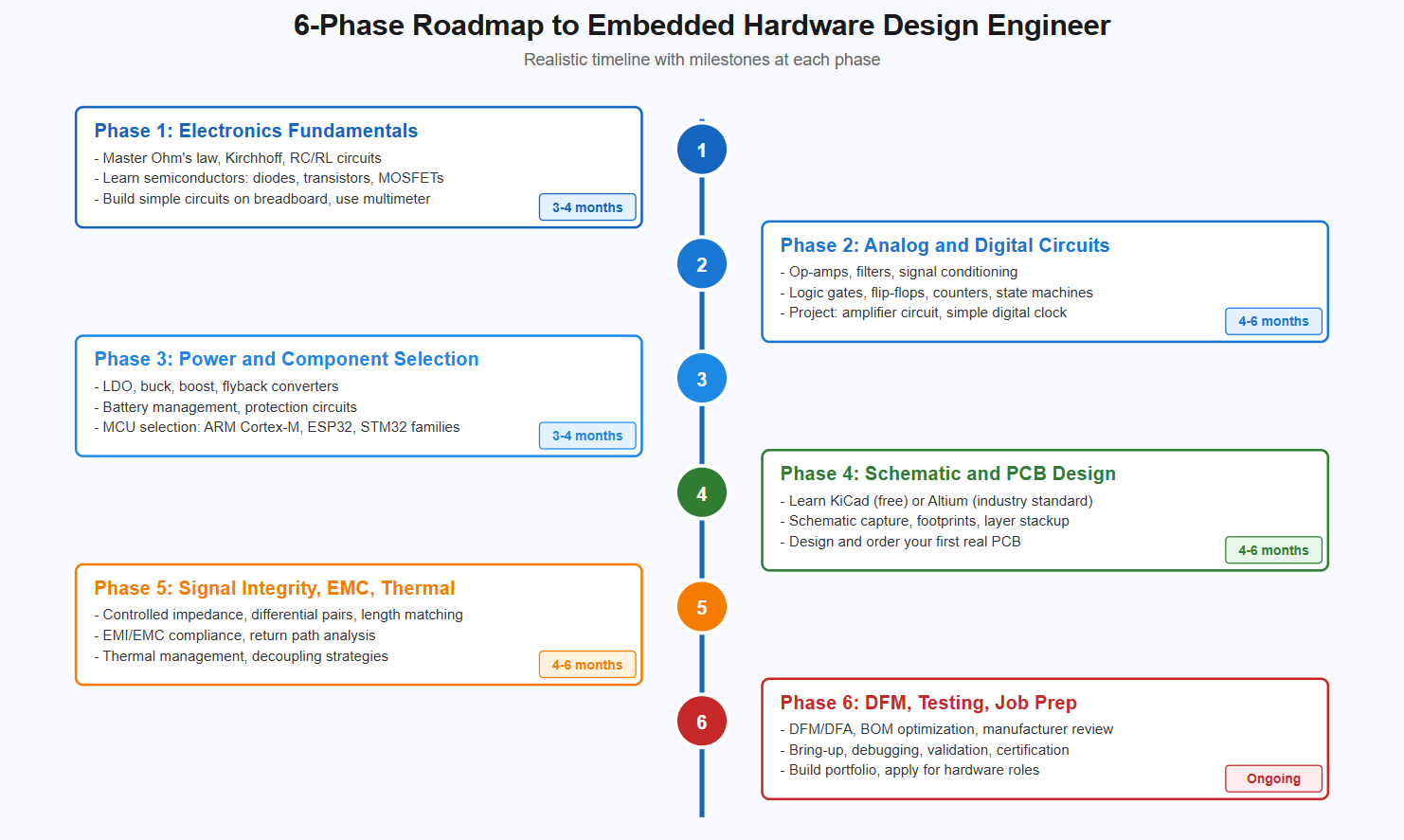
The 6-Phase Roadmap
Phase 1: Electronics Fundamentals (3-4 months)
Before you touch CAD software, you must understand electricity itself.
What to master:
-
Ohm's law, Kirchhoff's voltage and current laws
-
Series and parallel circuits
-
Resistor, capacitor, inductor behavior (DC and AC)
-
RC and RL time constants
-
Diodes: forward voltage, reverse leakage, Zener behavior
-
Bipolar transistors (BJT) and MOSFETs at a basic level
-
Reading schematics and component datasheets
How to practice:
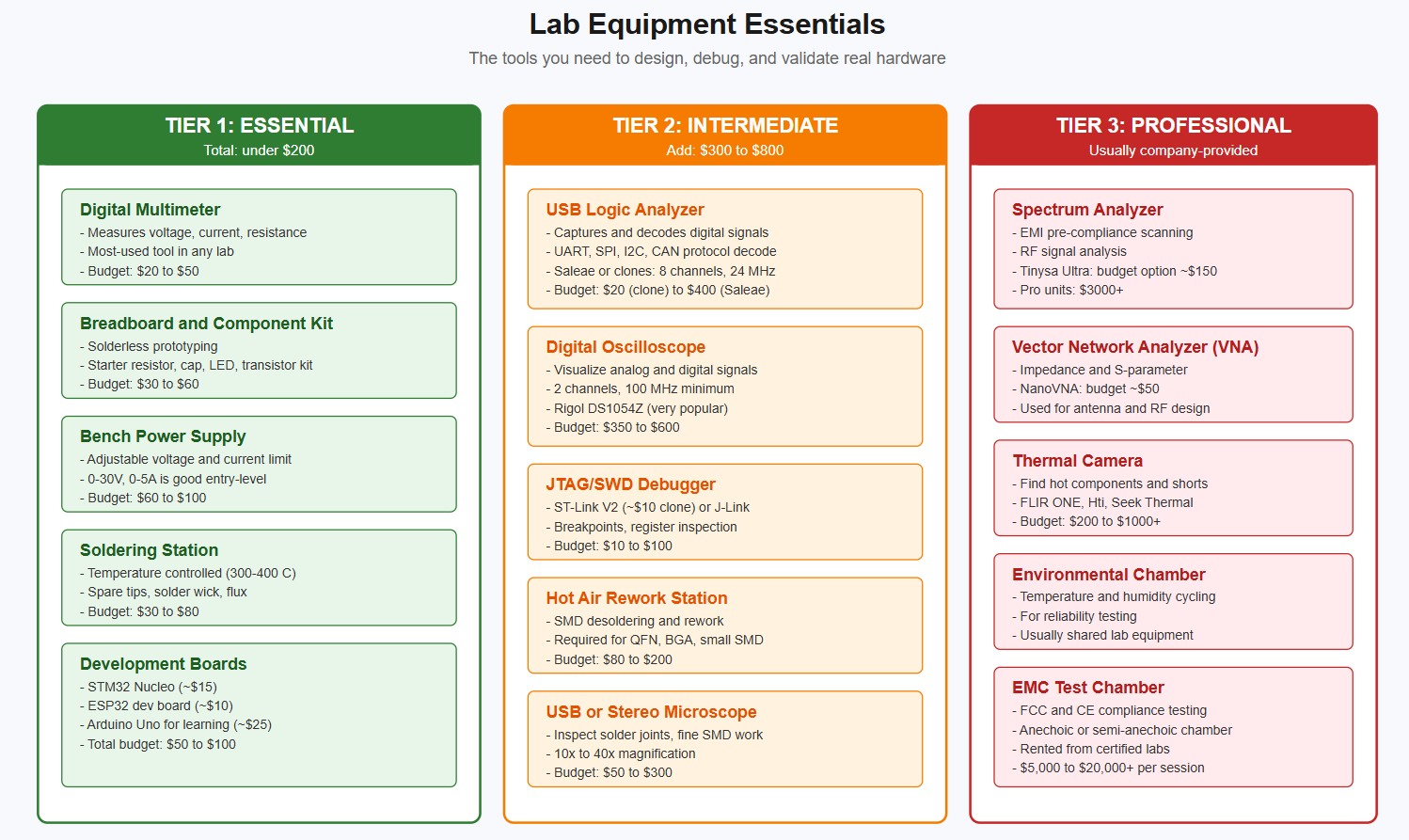
Get a breadboard, a power supply, a multimeter, and a small kit of resistors, capacitors, LEDs, and transistors. Build circuits from textbooks. Predict what they should do, then measure to verify. The act of measuring vs predicting is what builds intuition.
Common mistake:
Many students try to skip this phase. They jump to KiCad and copy reference designs. When something does not work, they have no foundation to debug. Do not skip this.
Lab Equipment :
Phase 2: Analog and Digital Circuit Design (4-6 months)
Now you go from understanding individual components to designing real circuits with them.
Analog topics:
-
Op-amp circuits: inverting, non-inverting, summing, integrator, differentiator
-
Active filters (low-pass, high-pass, band-pass)
-
Signal conditioning for sensors
-
Voltage references and precision circuits
-
Noise sources and how to reduce them
Digital topics:
-
Combinational logic (AND, OR, XOR, NAND, NOR)
-
Sequential logic (flip-flops, latches, counters, shift registers)
-
State machines (Moore, Mealy)
-
Setup and hold times
-
Logic families (TTL, CMOS, LVCMOS) and voltage levels
Phase 3: Power Design and Component Selection (3-4 months)
Every product needs power. Getting the power design right is one of the most common places where junior hardware engineers fail.
What to learn:
-
Linear regulators (LDOs): when to use, dropout voltage, thermal limits
-
Switching regulators: buck (step-down), boost (step-up), buck-boost
-
Selecting inductors and capacitors for switching converters
-
Battery technologies: Li-ion, LiPo, NiMH, primary cells
-
Battery management circuits, protection, charging
-
Power sequencing for multi-rail systems
-
Heat dissipation and thermal calculations
MCU and SoC selection:
You also need to learn how to read and compare microcontroller datasheets. The major families:
-
STM32 (ARM Cortex-M) — Widely used in industrial and consumer. Huge ecosystem.
-
ESP32 (Xtensa, RISC-V variants) — Built-in WiFi and Bluetooth. Great for IoT.
-
nRF52 / nRF53 — Bluetooth Low Energy specialists.
-
PIC and AVR — Older but still common in low-cost designs.
Phase 4: Schematic and PCB Design (4-6 months)
This is the phase where you start producing real designs that can be manufactured.
Pick one CAD tool:
-
KiCad — Free, open-source, has become genuinely professional. Best choice for learners and many companies now use it.
-
Altium Designer — Industry standard at most companies. Expensive license. Worth learning if you want a corporate job.
-
OrCAD — Common in older companies and defense.
-
Eagle (Fusion 360 Electronics) — Owned by Autodesk now. Decent for hobbyists.
Start with KiCad. It is free, works on all platforms, and the workflow translates to other tools later.
What to learn:
-
Schematic capture: symbols, nets, hierarchy, sheets
-
Footprint creation according to IPC-7351 standards
-
PCB layout: component placement, routing, design rules
-
Layer stackup design (2-layer, 4-layer, 6-layer)
-
Ground and power planes
-
Via types (through-hole, blind, buried, microvia)
-
Generating Gerbers, BOMs, and pick-and-place files
Phase 5: Signal Integrity, EMC, and Thermal (4-6 months)
This phase separates hobbyists from professionals.
Signal integrity topics:
-
Transmission line behavior at high frequencies
-
Controlled impedance traces
-
Differential pair routing (USB, Ethernet, LVDS)
-
Length matching for parallel buses
-
Crosstalk, ground bounce, ringing
-
Decoupling capacitor placement and selection
EMC and EMI:
-
Sources of electromagnetic interference
-
Return path discontinuities (covered in our Top 10 PCB Layout Mistakes post)
-
EMI filters: ferrite beads, common-mode chokes, TVS diodes
-
ESD protection design
-
Pre-compliance testing with a spectrum analyzer
-
Designing for FCC Part 15, CE, and other standards
Thermal management:
-
Junction-to-ambient thermal resistance
-
Heat sinking, thermal vias, copper pours
-
Derating components for high-temperature operation
-
Identifying thermal hotspots with a thermal camera
This is also where you should read our PCB design posts on ElectroDoctor. The deeper your understanding of these layout issues, the fewer board revisions you will need.
Phase 6: Component Knowledge: What to Memorize
Hardware engineers need a working knowledge of dozens of component families.
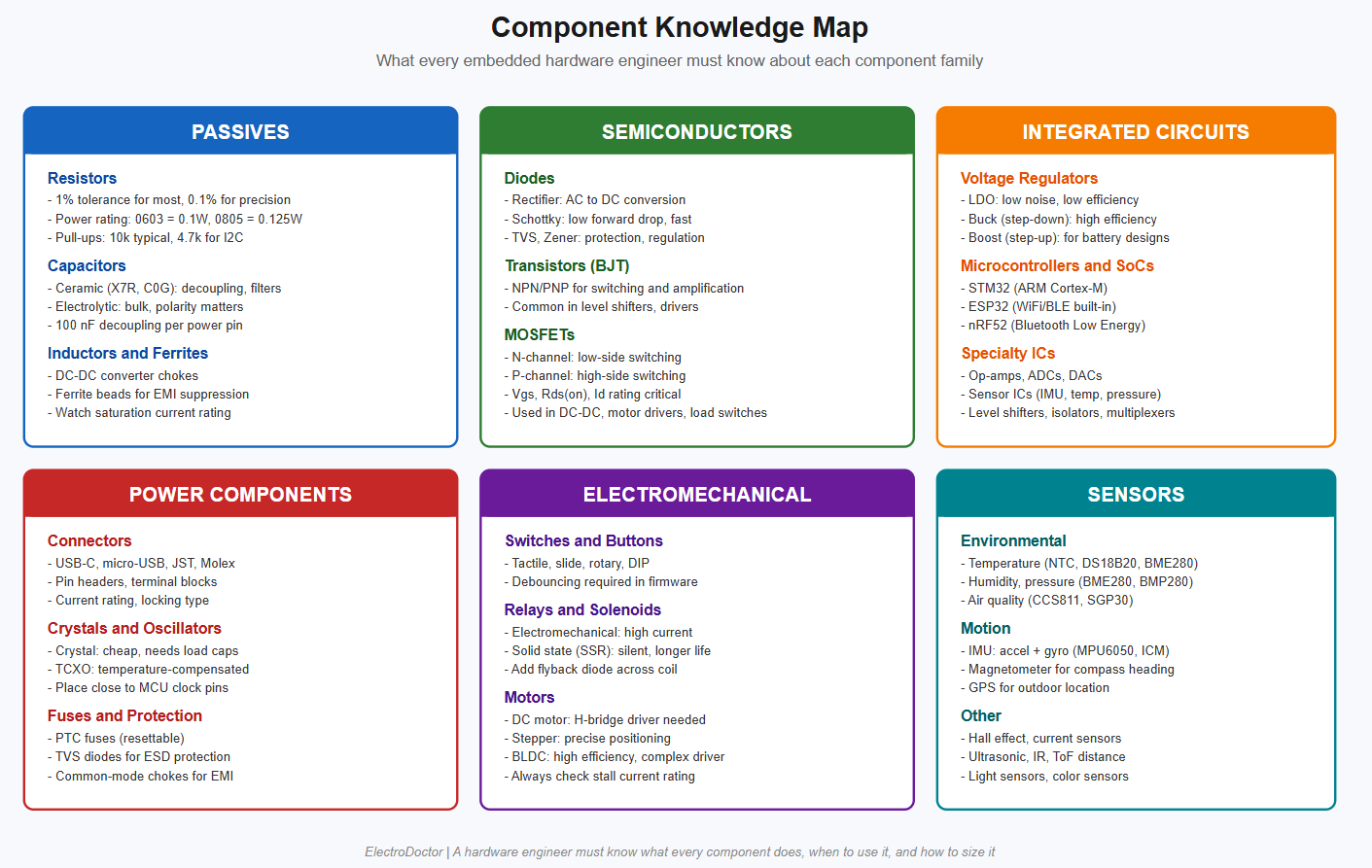
You do not need to memorize every part number. You do need to know what each category does, when to use each option, and how to size the part. The datasheet has the rest.
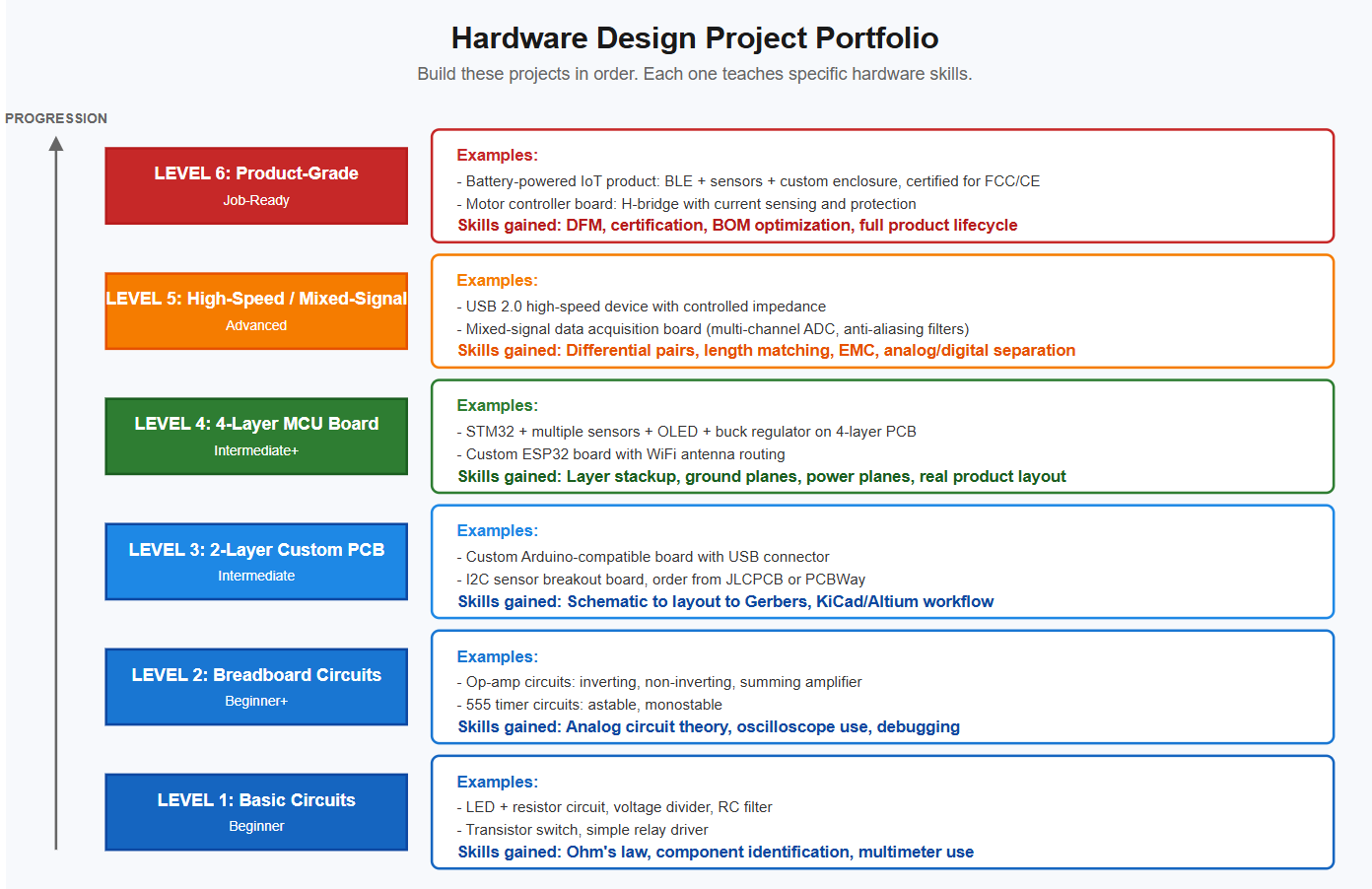
Project Portfolio: What to Build
Your portfolio gets you interviews. Without real projects, no employer will trust your skills.
Salary Expectations (Reality Check)
Hardware engineers generally earn slightly more than equivalent firmware engineers because the skill takes longer to build and the supply is smaller. Numbers depend heavily on country, domain, and company. Verify with Glassdoor or Levels.fyi for your region.
-
Junior hardware engineer (0-2 years) — India: ₹4-9 lakh INR/year; US: $75-120k USD/year
-
Mid-level (2-5 years) — India: ₹9-22 lakh INR/year; US: $110-160k USD/year
-
Senior (5-10 years) — India: ₹22-55+ lakh INR/year; US: $140-200k+ USD/year
Domain matters even more for hardware than for firmware. Defense, aerospace, and medical pay the most. Consumer electronics pays less but iterates faster.
Hardware vs Firmware: Which Should You Pick?
This is a common question. Honest comparison:
Pick hardware if:
-
You enjoy physical things, prototypes, and the smell of solder flux
-
You are patient (board revisions take weeks)
-
You want fewer competitors in the job market
-
You are okay spending money on equipment
Pick firmware if:
-
You prefer software workflows (compile, run, debug)
-
You want faster feedback loops
-
You have less budget for equipment
-
You want to ship features faster
Reality: Many senior engineers do both. Hardware engineers who can write firmware are more valuable than pure-hardware engineers. Firmware engineers who understand hardware are more valuable than pure-firmware ones. Cross-train when you can.